Email marketing software, and what it will not fix

Email marketing software stores a list, segments it, sends to it and reports what happened. It does not fix a bad offer or a bought list. Since February 2024, anyone sending 5,000 messages a day to personal Gmail needs SPF, DKIM, DMARC, one click unsubscribe and a spam rate under 0.30 percent.
Email marketing software is the cheapest channel in most accounts and the one people ask the wrong question about. The question is almost never which vendor. It is what you are sending, to whom, and whether it arrives.
I have run email alongside paid media for 14 years. The pattern does not change. The tool is the least interesting variable in the room.
What does email marketing software actually do?
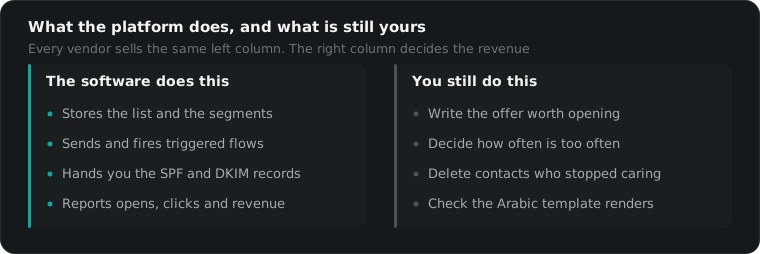
Email marketing software stores a list, sends to it, splits it into segments, fires automated sequences and reports what happened. That is the whole product. It will not write the offer, clean a list you bought, or make a discount code interesting. On most accounts the sending is the easiest part of the job.
Every vendor sells the same four things under different names. A contact database. A template editor. A trigger system that reacts to behaviour. A reporting screen.
Where they genuinely differ is narrow: how the price scales with your list, whether they connect to your store platform without a developer, how right to left templates behave, and how much deliverability work they do on your behalf.
That last one is the only difference worth paying a premium for, and only above serious volume. Below that you are paying for a template editor.
Right to left is worth naming separately. Plenty of email marketing software still breaks Arabic templates in Outlook, mirrors buttons the wrong way, or drops the direction attribute when a template is duplicated. Send yourself a test in Arabic before you commit a client to a platform. We have had to rebuild a whole template library twice because nobody checked.
What breaks deliverability, and can the software fix it?
Deliverability breaks for three reasons: bad authentication, complaints, and sending to people who never asked. Since February 2024, Gmail requires SPF, DKIM and DMARC from anyone sending 5,000 messages a day to personal accounts, plus one click unsubscribe and a spam rate under 0.30 percent. Software helps with two of those.
Google’s bulk sender guidelines are worth reading in the original, because most summaries of them are wrong. The headline number is the spam rate, reported in Postmaster Tools. Google asks for under 0.30 percent and recommends staying below 0.10 percent so a bad week does not tip you over.
Authentication is a DNS job you do once. Any decent email marketing software will hand you the records and check them for you.
Complaints are your problem, not the vendor’s. They come from sending too often, sending to people who forgot signing up, and hiding the unsubscribe link. Every one of those is a decision somebody in marketing made deliberately.
The third cause is the one nobody wants to hear. If your list came from a trade show badge scanner, a competition, or a purchase, it will hurt you no matter which platform sends it. The awkward version: cutting a list in half often raises revenue, because the half you keep actually opens things.
Why are your open rates lying to you?
Open rates are inflated because Apple Mail Privacy Protection loads the tracking pixel whether or not a human read the message. Apple turned it on in 2021 and most iPhone users accepted the prompt. So an open rate is now a mix of real reads and machines, and it cannot be compared to your 2020 numbers.
Apple documents the behaviour itself in its guide to Mail Privacy Protection. The practical effect is that any automation triggered by an open is firing on noise.
We see this most in the Gulf, where iPhone share is high. On one Saudi account the reported open rate jumped by roughly a third in the months after the feature rolled out, while clicks and revenue did not move at all.
So judge subject lines on clicks. Judge campaigns on revenue per recipient. Keep open rate as a trend line on your own account and never as a benchmark against anybody else’s.
Which features do people pay for and never use?
Predictive send time, AI subject lines, lead scoring, landing page builders and SMS add ons. Most accounts pay for all five and use none of them after the first month. The features that earn money are boring: a few real segments, a welcome sequence, an abandoned checkout flow, and an unsubscribe that works first time.
The upgrade is usually sold on the feature nobody uses. That is not an accident, it is how the tier above gets justified.
| What the marketing page says | What it means once you are live |
|---|---|
| Unlimited sends | Unlimited inside a contact tier you will outgrow |
| AI subject lines | A generator you stop opening in week three |
| Advanced segmentation | Filters, which every vendor already has |
| Deliverability support | A help article, unless you are on an enterprise plan |
| Predictive send time | A lift too small to measure at most volumes |
| 99 percent delivery rate | Accepted by a server, which is not seen by a person |
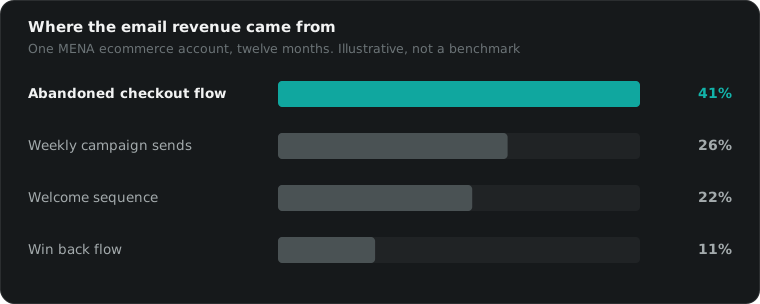
The flows are where the money sits, and they are the same on every platform. On one MENA ecommerce account we ran for a year, the abandoned checkout flow produced about 41 percent of email revenue from under 3 percent of the sends. That is an illustrative number from one account, not a benchmark, but the shape holds everywhere I have looked.
How much should email marketing software cost?
Email marketing software is priced per contact or per send, so the bill grows with the list rather than with the revenue. That is the trap. A list you never clean is a subscription you pay twice for, once to the vendor and again in deliverability, when dead addresses drag your sending reputation down with them.
I will not quote vendor prices here, because they change and half the numbers on comparison sites are out of date. Check the pricing page yourself, then do one calculation the reviews skip. Divide the annual cost by the revenue email produced last year. If it is over about 5 percent, you are on the wrong tier or the wrong list.
The other cost nobody prices is the migration. Moving templates, flows and six years of history between platforms takes a fortnight of somebody’s time, and you have to warm the new sending domain slowly on top of that. Email marketing software vendors will help you import a list in an afternoon. They will not rebuild your automations for you.
Sunsetting unengaged contacts is the cheapest optimisation in the channel. It lowers the bill and raises the inbox placement at the same time. Almost nobody does it, because deleting contacts feels like deleting money.
Our own fees work the same way, which is why they are published rather than quoted on a call. It starts at $1,095 flat under $2,500 of monthly ad spend, then a marginal rate stepping 10, 9 and 8 percent, landing at 10.4 percent all in at $50,000.
What do we actually recommend?
Pick the cheapest tool that does segments, flows and a clean unsubscribe, then spend the saved money on the offer. Switching vendors rarely fixes results, because the list and the offer travel with you. We have moved three accounts between platforms and revenue changed by less than 5 percent in each case.
Set up authentication properly on day one. Build the welcome and abandoned checkout flows before you write a single campaign. Clean the list every quarter, whatever it does to the contact count.
Then treat email as one line in a stack rather than a project. The rest of ours is in the post on digital marketing tools, and the social half is in social media management tools. If you want to know whether your email marketing software is the problem or the list is, 15 minutes is usually enough to tell.
Questions people actually ask
What does email marketing software actually do?
It stores contacts, splits them into segments, sends campaigns, runs automated sequences triggered by behaviour, and reports opens, clicks and revenue. That is the whole product across every vendor. The differences between platforms are in price, template editing, integrations with your store, and how much of the deliverability work they handle for you.
Does switching email platforms improve results?
Rarely. The list, the offer and the sending reputation of your domain travel with you, and those are what decide revenue. Switching is worth it when the current tool cannot connect to your store, when the price per contact has become absurd, or when you genuinely need automation it does not have.
Are open rates still useful in 2026?
Only as a rough trend on your own account. Apple Mail Privacy Protection loads tracking pixels for its users whether or not a person read the message, so open rates are inflated by an unknown amount that varies by audience. Judge subject lines on clicks and revenue per recipient instead.
What is the minimum I need to avoid the spam folder?
SPF, DKIM and DMARC on your sending domain, a working one click unsubscribe, and a list of people who genuinely opted in. Google asks bulk senders to hold spam complaints below 0.30 percent in Postmaster Tools and recommends staying under 0.10 percent. No software will save a bought list.
How much should a small business pay for email software?
Most vendors price per contact, so the honest answer is: as little as the list justifies. Below a few thousand engaged contacts, the free or entry tier of almost any platform is enough. The money is better spent on the offer and on cleaning the list than on a higher plan.
Is email worth it in the Gulf?
Less than in the US, and it depends on the category. In Gulf B2C, WhatsApp and SMS usually beat email on both open and reply, and many lists there were collected at a till rather than online. Email still earns its place for receipts, win back and B2B, but it is rarely the first channel.