Ad safe zone checker for Instagram, Facebook, TikTok and Snapchat
A safe zone is the part of an ad the app’s own interface covers: the profile row, the caption, the buttons. Anything you put there is hidden from the person watching. This tool shows the covered area on every placement you pick, side by side, on your own files, in your browser. The figures are ones we measured in each platform’s own Ads Manager, because two of these four publish no safe zone at all and the other two disagree with their own tools.
Add your creative
images and videoDrop files here
PNG, JPG, WebP, MP4, MOV. No size limit, because there is no upload.
Runs in your browser. Nothing is sent anywhere.
Pick the placements
all of them open side by sideKeep dropping files in whenever you like. What is already checked stays put, the new ones are added to it, and the export always sends the full list.
Results
Nothing you opened here was uploaded, stored or sent anywhere.
Drop in every ad you are about to ship, static and video together. Video keeps playing with the zones on top. Nothing uploads, nothing is stored, and there is no account. Every figure is dated and says where it came from.
Why one safe zone per placement is the wrong answer
Every other checker ships a single mask per placement. That is not how the interface behaves. A Reels ad with a call to action button covers a different area than the same ad without one, a Stories ad with a disclaimer tightens the bottom band from 35% to 40%, and a 9:16 file dropped into Feed loses about 30% of its height to the crop before any overlay is drawn at all. The tool models each of those separately and lets you clear whichever one you are actually running.
What are the Instagram and Facebook safe zone sizes?
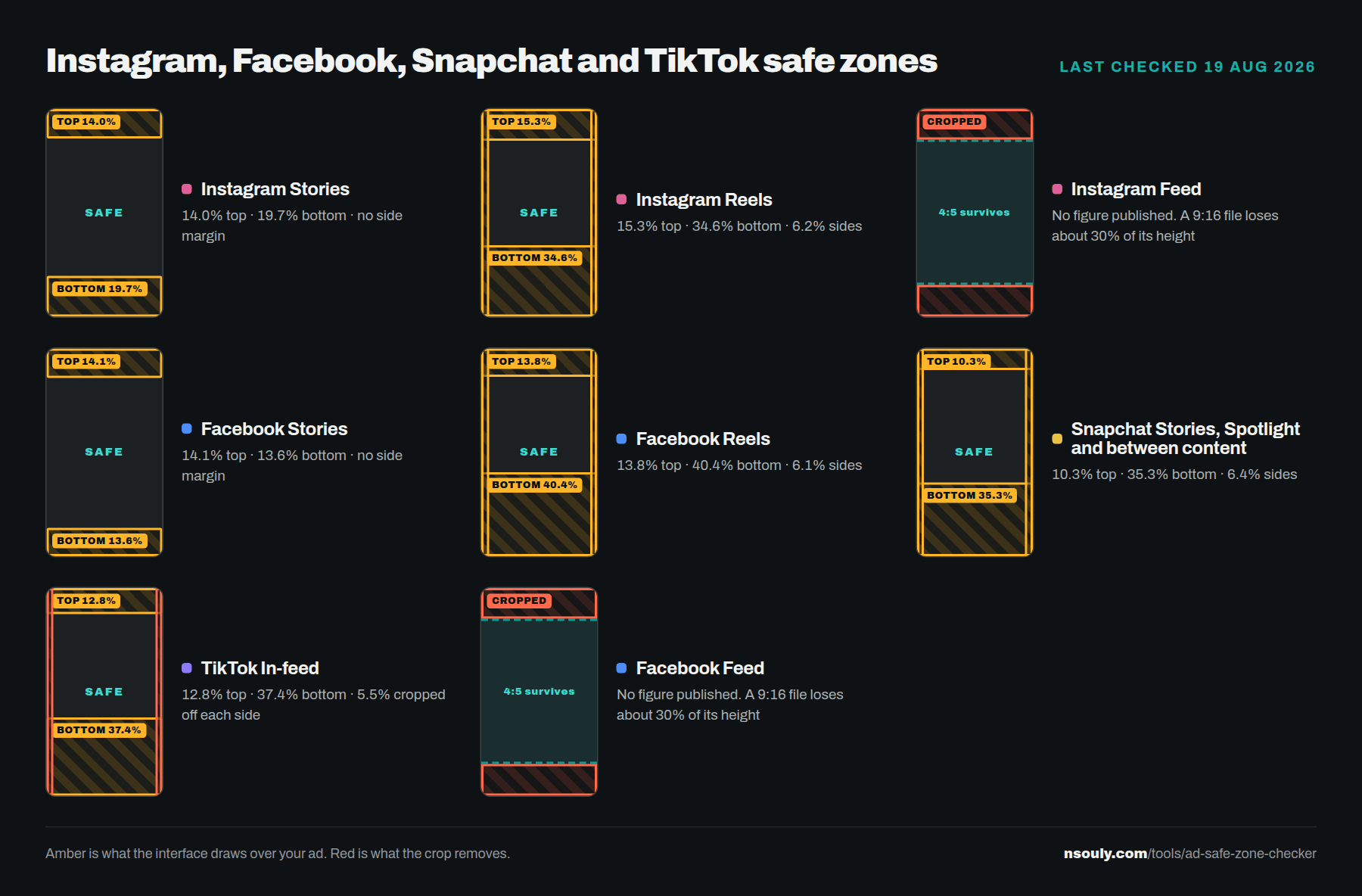
Meta publishes 14% off the top, 35% off the bottom and 6% on each side for Stories and Reels, and Meta’s own tool draws something different in three of those four placements. Instagram Stories loses no side margin at all and only 19.7% at the bottom. Facebook Reels takes 40.4%, five points deeper than the documentation.
These were read off Meta’s Ads Guide in a browser, and measured off Meta’s own Safe zone guardrail in Ads Manager on 19 August 2026 by uploading a ruled 1080x1920 file and finding the yellow overlay by colour. Figures are top / bottom / each side, as a percentage of the creative.
| Placement | Meta publishes | Its own guardrail draws | The gap |
|---|---|---|---|
| Instagram Stories | 14 / 35 / 6 | 14.0 / 19.7 / 0 | Bottom 15 points shallower, no side margin at all |
| Instagram Reels | 14 / 35 / 6 | 15.3 / 34.6 / 6.2 | Close, slightly deeper at the top |
| Facebook Stories | 14 / 20 video, 14 / 35 / 6 image | 14.1 / 13.6 / 0 | Shallower than either published figure |
| Facebook Reels | 14 / 35 / 6 | 13.8 / 40.4 / 6.1 | Bottom 5 points deeper than published |
| Instagram Feed | No figure published | No Feed preview exists | Meta warns the call to action covers creative, then gives no size |
| Facebook Feed | No figure published | No Feed preview exists | Same |
Precision about plus or minus half a percent, one capture each. Re-checked monthly and dated on every card in the tool.
Six things about ad safe zones nobody has published
Six things fall out of the measurements that no other guide reports: Stories are drawn with no side margin, Facebook Reels reserves five points more than Meta documents, the action rail every template copies does not exist, TikTok reserves more than anybody and crops your width on top of it, Snapchat is the only platform telling the truth, and a square is not the safe universal export people think it is.
Stories have no side margins. Reels do, and they measure 6.1 to 6.2%, which matches the published 6% exactly. Meta publishes 6% for Stories too and its own tool does not draw it, which suggests the side rule is a Reels rule that was copied onto the Stories page.
Facebook Reels is the dangerous one. The guardrail draws 40.4% where the documentation says 35%. Following Meta’s own published figure puts your text inside a band Meta’s own tool marks as covered, and every competing checker uses 35%.
The action rail everyone quotes does not exist. The numbers going round for the right hand button column on Reels, 90px, 120px, 227px, come from a third party measuring a 2023 file. The current guardrail shows no such shape: the right side of Reels is a plain 6% margin, top to bottom, identical to the left.
TikTok reserves 37.4%, not 35%. TikTok publishes no safe zone figures at all, only template files, so every checker and every spec sheet uses 35% by analogy with Meta. Its own overlay draws 37.4%. That is two and a half points of an ad, at the exact end of it where the button and the caption live.
TikTok crops your width before it covers anything. Meta describes zooming a creative to fill the screen and will never confirm when it happens. TikTok does it visibly, in its own preview: a 9:16 is scaled to fill a device about 9:18, so roughly 11% of your width leaves the screen. That is not a margin the interface sits on. It is gone, which is why the tool draws it red rather than amber.
Snapchat is the only one telling the truth. It claims one safe zone across Stories, Spotlight and Commercials. Six captures across three formats and three placements all measure 10% top, 35% bottom, 6% each side, agreeing to within 0.4 of a point. Its Collection ads do not cost you room either: the tile row sits inside the 35% already reserved, which is the opposite of what every designer assumes.
A square is not the safe universal export. On Meta it is: a 1:1 loses nothing to the Feed call to action row where a 4:5 does. On TikTok the safe zone belongs to the phone rather than to your file, so a square gets a free top and then loses 27% at the bottom and picks up an action rail across nearly a third of its width. Same file, two completely different answers.
All six, with the method, the tables and the one export that clears every vertical placement, are written up in full: Meta’s safe zone guide disagrees with Meta’s own tool.
What size should I export Stories and Reels at?
Export at 1440x2560. Every Meta Stories and Reels page recommends that size, and the industry works in 1080x1920 without checking. Both are 9:16 so both run, but only one of them is the size Meta asks for. For Feed, export square.
The pixel figures on Meta’s own pages do not match any canvas Meta recommends. The Facebook Stories video page says to leave “roughly 14% (250 pixels)” clear at the top. 14% of 2560 is 358 pixels. 250 pixels is 14% of 1780, which is not a size that appears anywhere. The percentages and the pixel counts on one page were written against different canvases, so work in percentages and the problem disappears. That is what this tool does, and it is why every figure on it is a percentage.
For Feed, a 1:1 square loses nothing to the call to action row and a 4:5 does. If you are only exporting one Feed asset, make it square.
Does cropping an ad stop it running in a placement?
No. Meta is explicit that cropping alone will not restrict delivery. Export a 9:16 file, leave Feed switched on, and the ad still runs in Feed, cropped by Meta rather than by you. Turning a placement off is the only thing that turns it off.
This is the most expensive misunderstanding in the whole topic, because it is invisible. The ad is live, the spend is going out, and the version being served is one nobody in the room has seen. The fix is two decisions in the media plan: pick the placements deliberately, and export one asset for every shape you left switched on.
It is also why this tool opens every placement at once instead of the one you designed for. The question is never whether your Stories asset works in Stories. It is what happens to it everywhere else it is about to run.
Instagram and Facebook safe zone questions
What is a safe zone in an Instagram or Facebook ad?
A safe zone is the part of your creative that the app's own interface does not cover. The profile row, the caption, the buttons and the progress bar are all drawn on top of your ad. Anything you place underneath them is hidden from the person watching, even though it looked fine in your design file.
What are the Instagram Stories and Reels safe zone sizes?
Meta publishes 14% off the top, 35% off the bottom and 6% on each side for Instagram Stories and Reels. Meta's own Safe zone guardrail in Ads Manager draws something different: on Instagram Stories it marks 14% top, 19.7% bottom and no side margin at all. Both readings are shown in the tool so you can clear either.
What is the TikTok safe zone?
TikTok publishes no figures at all, only downloadable template files. Measured off its own overlay in Ads Manager, a 9:16 in-feed ad reserves 12.8% at the top and 37.4% at the bottom. That bottom band is deeper than anyone else’s: Meta publishes 35%, Snapchat measures 35%, and every other checker uses 35% for TikTok because that is what people assume by analogy. TikTok also anchors the zone to the phone rather than to your file, so it scales a 9:16 to fill a taller device and about 11% of your width leaves the screen before anything is drawn over it.
What is the Snapchat safe zone?
10% top, 35% bottom, 6% each side. Six captures across three formats and three placements all measure the same, to within 0.4 of a point. Snapchat says it runs one safe zone across Stories, Spotlight and Commercials, and it is the only platform here whose documentation and whose own tool agree. Collection ads do not cost you room either: the tile row sits inside the 35% already reserved.
Does Instagram Feed crop a 9:16 video?
Yes. Instagram's Feed design page says taller media may be cropped back to the recommended 4:5, which is what live delivery does, so a 9:16 export loses about 30% of its height before the call to action row is drawn. A separate Meta page says 9:16 video in Feed keeps the Reels safe zones. The tool shows both.
What size should I export Stories and Reels at?
Every Meta Stories and Reels page recommends 1440x2560, not the 1080x1920 the industry works in. Both are 9:16 so both run, but 1440x2560 is the size Meta actually asks for. For Feed, export square: a 1:1 loses nothing to the call to action row, and a 4:5 does.
Does cropping an ad stop it running in a placement?
No. Meta is explicit that cropping alone will not restrict delivery, and that you need placement opt-outs as well. This catches people out constantly: a file exported at the wrong ratio still runs in every placement you left switched on, cropped by Meta rather than by you.
Do my files get uploaded anywhere?
No. The check runs entirely in your browser, so your creative never leaves the machine you are sitting at. There is no account, no upload, no size limit and nothing is stored. That matters if you are holding a client's unreleased campaign under an NDA.
Instagram and Facebook are trademarks of Meta Platforms, Inc. This tool is not affiliated with, endorsed by or sponsored by Meta. Platforms change these figures without notice, so every number here carries the date it was checked. Treat it as a design guide, not a guarantee, and confirm anything that matters against your own live delivery.