Facebook Audience Targeting in 2026: What Still Works
 My short answer
Facebook audience targeting now has 2 layers. Meta obeys your controls: locations, minimum age, languages and customer exclusions. Age, gender, interests and included audiences are only suggestions. What still works: broad targeting inside those controls, your customer lists, and creative that does the filtering.
Facebook audience targeting used to mean drawing a box around people and telling Meta to stay inside it. That’s not what the button does any more.
Now you hand Meta 2 things: rules and hints. It sticks to the rules. The hints, it’ll go past whenever it thinks it can find you a cheaper result somewhere else.
Most of the arguments about Facebook audience targeting are really about which of your settings is which. Get that right and most of the job is done.
Facebook ad targeting options in 2026
Facebook ad targeting options still come in 6 groups: locations, age and gender, languages, detailed targeting, custom audiences and lookalikes. What changed is how Meta treats them. Since Advantage+ audience became the default, each one is either a control that limits who sees your ad or a suggestion Meta can go past.
- Locations: countries, regions, cities and postal codes, reaching people who live in, recently spent time in or often visit them. A control. Meta still says a few impressions can land outside, because location signals aren’t perfect.
- Age and gender: the minimum age is a control and is never overruled. The age range and gender are suggestions. With Advantage+ audience you can’t go under 18, or older in some countries.
- Languages: a control.
- Detailed targeting: interests, demographics and behaviours. A suggestion by default, and a shrinking list (more on that below).
- Custom audiences: people from your own data or from engagement on Meta. Website visitors through the Pixel, app users, customer lists, catalog and offline activity, plus video viewers, lead forms, your Page and your Instagram account. Up to 500 per ad account. Excluding one is a control. Including one is a suggestion.
- Lookalike audiences: people who resemble a source audience. Meta needs a source of at least 100 people and recommends 1,000 to 5,000. Smaller percentages match the source more closely. Advantage+ lookalike switches on by itself for new ad sets using website, app or customer list sources, so delivery can go past the percentage you picked.
Controls, and binding
- Locations
- Minimum age
- Languages
- Custom audience exclusions
Suggestions, and advisory
- Age range and gender
- Detailed targeting
- Custom audiences to include
- Lookalikes, via Advantage+ lookalike
The mistake I see most in Facebook audience targeting is treating a suggestion as if it were a control, then reporting on it as if the box held.
What changed: Advantage+ audience is the default
Advantage+ audience is applied automatically at the ad set level whenever it’s available, so Meta ad targeting now starts from Meta’s AI, not from your interest list. You set controls that limit who can see the ad and suggestions it uses as a starting point. It’ll show ads outside your suggestions, never outside your controls.
| Setting | Hard limit? | What Meta does with it |
|---|---|---|
| Locations | Yes | Stays inside, unless you tick Reach more people likely to respond to your ads |
| Minimum age | Yes | Never overruled, even by an age suggestion |
| Languages | Yes | Stays inside |
| Custom audience exclusions | Yes | Keeps those people out |
| Age range and gender | No | Starting point it can go past |
| Detailed targeting | No | Starting point it can go past |
| Custom audiences and lookalikes to include | No | Starting point it can go past |
Want a suggestion to act as a hard limit again? Pick Further limit your audience (or Further limit the reach of your ads) and untick Use as a suggestion. That’s the wording on Meta’s audience controls and suggestions page, and it’s the switch most old playbooks are missing.
Meta’s case for the default: 14.8% lower cost per result on Awareness, 9.7% on Traffic, Engagement and Leads, and 7.2% on Sales and App promotion. Those are Meta’s numbers, not mine. They’re also why Ads Manager nudges you the moment you narrow things down.
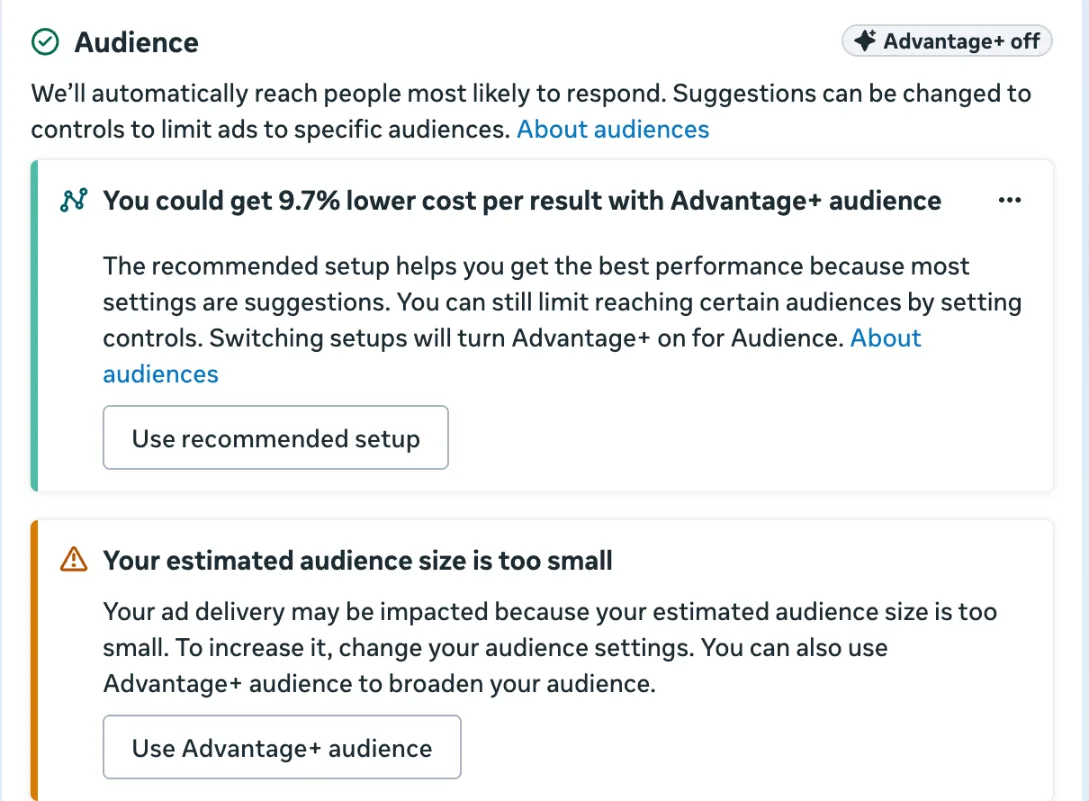
It’s the same screen you’ll meet setting up Facebook ads for a small business.
One place Meta itself says not to use Advantage+ audience: retargeting. There, include the custom audience as a control, not a suggestion.
Detailed targeting removals (and what replaced exclusions)
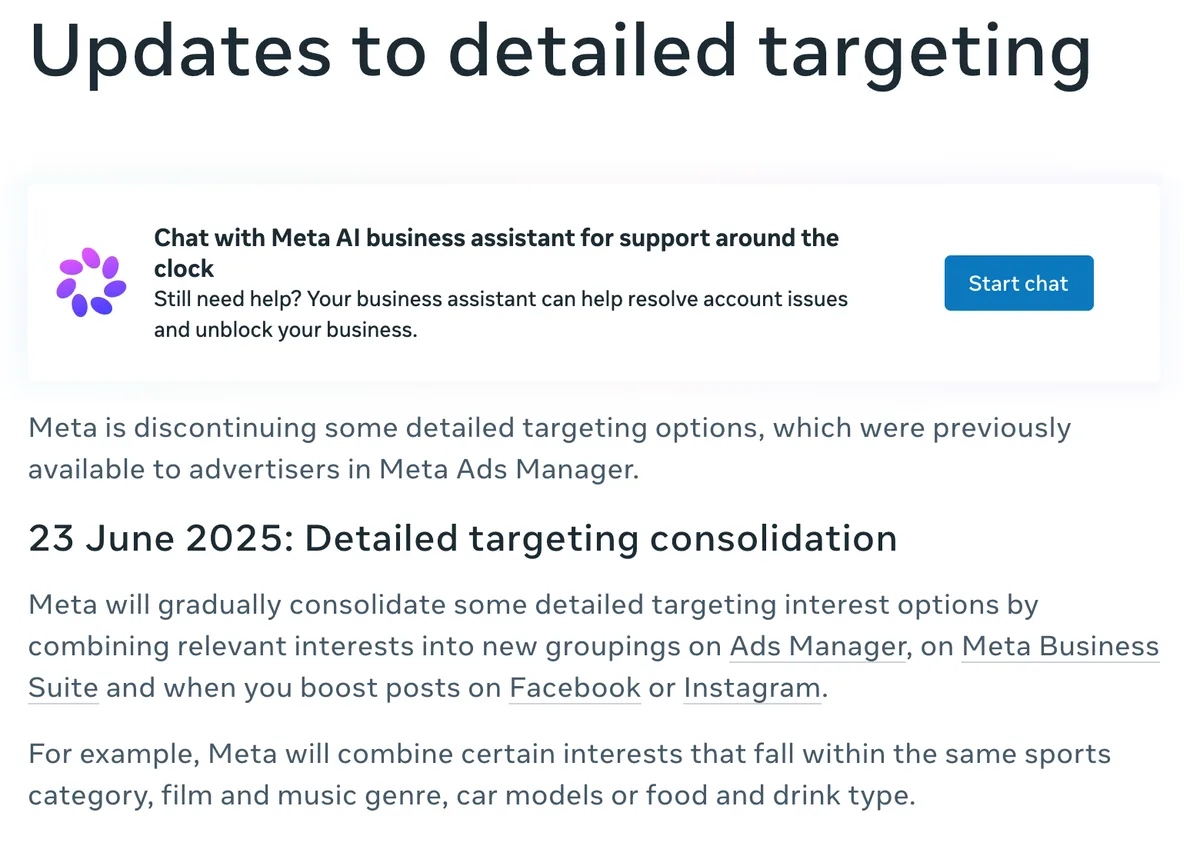
Meta removed detailed targeting exclusions in Ads Manager on 31 March 2025 and on boosted posts on 10 June 2025. You can’t add one to a new ad set, and they were stripped from active campaigns. Detailed targeting itself keeps shrinking too, first with sensitive topics in 2022, then with merged interests in 2025.
Here’s how it went, from Meta’s updates to detailed targeting:
- 19 January 2022: options tied to topics people may see as sensitive went, like health causes, religion and sexual orientation, along with rarely used and overlapping ones.
- 31 March 2025: detailed targeting exclusions gone from Ads Manager, including from active campaigns. Boosted posts followed on 10 June 2025.
- 23 June 2025: Meta started merging interests into broader groupings, such as ones in the same sport, film and music genre, car model or food and drink type. Campaigns still using the old options stopped delivering on 15 January 2026 if nobody replaced them.
Meta’s reason for pulling exclusions was a test: median cost per conversion came out 22.6% lower without detailed targeting exclusions than with them.
What you use instead:
- Custom audience exclusions: upload customers, subscribers and applicants, and exclude the list. There’s even an exclusion only customer list type built for this.
- Account controls: in Advertising settings, for limits that apply to every campaign in the ad account, such as a minimum age, countries you can’t ship to, and a short list of brand protection and employer exclusions. Placement limits live there too, which matters for Meta ad placements.
If your Facebook audience targeting still leans on an interest exclusion, that ad set hasn’t been rebuilt since March 2025.
What still works in Facebook audience targeting
What still works in Facebook audience targeting is the part you own: hard controls, exclusions from your own lists, good customer lists, and conversions worth optimising for. You can’t stop Meta expanding past your suggestions. You can shape what it expands towards, and stop it spending on people you already have.
- Separate campaigns for prospecting and retargeting. Budget inside a campaign follows the cheapest conversion, which is almost always retargeting. If you want to know what prospecting costs, it needs its own campaign and its own budget.
- Exclude customers from a list, in every prospecting ad set. Recent purchasers, active subscribers, staff. Uploaded, refreshed, applied every time. It’s the most valuable audience setting left.
- Seed lookalikes from your best customers. Upload your top 20% by lifetime value as one list and everyone else as another. Meta’s own help says a source made from your best customers can beat one made from all of them.
- Refresh lists monthly, automated. Not a quarterly reminder someone forgets.
- Watch the match rate. If 10,000 emails match 3,000 people, the list is stale, full of work addresses or hashed wrong. Every lookalike built from it inherits that, and nothing downstream tells you.
- Feed the model better conversions. Optimising for a purchase with a value beats optimising for an add to cart. That starts with advertisement tracking that actually fires.
- Read the breakdowns, then fix the creative. If delivery skews to men over 55 and your buyers are women around 28, the fix is the ad and the landing page, not another checkbox.
Why broad usually beats narrow
Narrowing feels like precision and behaves like a tax. Every constraint removes eligible impressions, which pushes CPM up, which cuts the conversions the model sees, which slows learning. Broad Facebook audience targeting with a hard exclusion list gives the model room and still keeps your customers out.
The chart below is illustrative, from 1 MENA ecommerce account, but the shape repeats often enough that I start broad by default and make people argue for narrowing.
The real targeting is the creative. An ad that opens on a specific product, in a specific language, about a specific problem, filters harder than any interest checkbox, and it doesn’t raise your CPM. It’s why I spend more time on creative briefs than on segment lists, and why contextual advertising often does well on cold traffic.
None of this is glamorous. All of it survives the next interface change, which is more than most Facebook targeting advice written before 2025 can say.
Google works the same way
Google treats audiences the same way now. Performance Max audience signals guide its AI rather than restrict it, and Google says they can take up to 2 weeks to fully take effect.
Similar segments stopped being generated in May 2023 and were removed from all campaigns in August 2023. And a Customer Match list needs at least 100 members added or updated within 540 days to stay eligible.
Audience research tools (and where Facebook Audience Insights went)
The standalone Facebook Audience Insights tool is gone. Meta’s help center says Audience Insights is no longer available and points people to Meta Business Suite Insights instead. Meta audience insights now live under Insights, then Audience, which shows who follows you and has a Potential audience tab for research.
So the audience insights tool people still search for is really 5 places now:
- Meta insights on your followers: Insights, then Audience, shows the age and gender, top cities and top countries of the people who follow you. Useful for a Page with real followers, thin for a new one.
- Potential audience: filter by location, age, gender, interests and language, see an estimated audience size, then save it as an audience to use in Ads Manager. These are the targeting insights the old tool used to give.
- Ads Manager breakdowns: Facebook ads insights by age, gender, country, region and placement, for the people who actually clicked and bought. Better than any research tool, because these are real buyers.
- Audiences in Ads Manager: where your custom and lookalike audiences live. Meta’s help still calls it Audience Manager in places. New lookalikes don’t show an estimated size there any more, because you no longer pick a location when you create one. You see the size once it’s in an ad set.
- Interest split tests: still useful as research. Splitting by interest tells you which angle a group responds to, even when delivery goes past it. Use it to learn what to say, then let broad targeting find the people.
Looking for the old Facebook Insights tool for your Page numbers? Same place, under Insights in Business Suite.
Meta audience targeting in MENA
Meta audience targeting in MENA works differently in 3 ways that catch imported playbooks. Arabic and English audiences in the GCC behave like separate markets, so language beats interest as a split. The iPhone share swings a lot between countries, which changes measurement. And Ramadan moves costs more than any targeting change.
- Language: the strongest split nobody uses properly. Different CPMs, different creative winners, different times of day. And languages is one of the controls Meta still obeys.
- Device mix: on StatCounter’s October 2026 figures, iOS is about 42% of mobile browsing in Saudi Arabia, 19% in the UAE and 18% in Egypt. The same setup gets very different measurement quality, so compare countries separately or you’ll draw the wrong conclusion about Saudi.
- Seasonality: Ramadan and the 2 Eids move CPMs, conversion rates and shopping hours more than any audience change, which makes it a media planning problem, not a targeting one.
What I’d do
I treat Facebook audience targeting as evidence handed to a model, not a fence. Broad prospecting inside hard controls, exclusions from customer lists refreshed every month, lookalikes seeded from the best customers, and creative doing the segmenting. On most accounts that costs less per customer than the interest stacks it replaces, and it’s less work to maintain.
Where I’d still narrow Facebook audience targeting: retargeting, a legal age limit, a country you can’t ship to, a language you don’t serve. Those are real business limits, and they belong in controls.
Not sure what your Facebook audience targeting is actually doing? Talk to me.
Questions people actually ask
Does Facebook audience targeting still work?
Partly. Locations, minimum age, languages and custom audience exclusions are controls Meta obeys. Age, gender, detailed targeting and included custom audiences are suggestions inside Advantage+ audience, so delivery can go past them when Meta expects a cheaper result. Your own customer lists and exclusions still do exactly what they say.
What are the Facebook ad targeting options?
Locations, age, gender, languages, detailed targeting (interests, demographics and behaviours), custom audiences built from your own data or from engagement, and lookalike audiences seeded from a custom audience. Under Advantage+ audience, locations, minimum age, languages and custom audience exclusions are hard controls. The rest work as suggestions unless you choose Further limit your audience.
Is Facebook Audience Insights still available?
No. Meta's help center says Audience Insights is no longer available and points people to Meta Business Suite Insights. Go to Insights, then Audience. You get your followers' demographics, plus a Potential audience tab where you filter by location, age, gender, interests and language, see an estimated size and save it as an audience for Ads Manager.
Can I still exclude interests on Facebook ads?
No. Meta removed detailed targeting exclusions in Ads Manager on 31 March 2025 and on boosted posts on 10 June 2025. To keep people out, exclude a custom audience, such as an uploaded customer list, or use the account controls in Advertising settings, which keep a short list of brand protection and employer exclusions.
What is the difference between a custom audience and a lookalike audience?
A custom audience is people you already have a relationship with: site visitors, app users, customer emails, video viewers. A lookalike is a group Meta builds of people who resemble that source. Meta needs a source of at least 100 people and recommends 1,000 to 5,000. The lookalike is only as good as the list it was seeded from.
Should I target broad or narrow?
Broad, in almost every account I run. Narrow targeting raises CPMs, starves the learning phase of conversions and hides the fact that your creative is doing the real targeting. Start broad with strong exclusions, then narrow only when you have evidence a segment behaves differently, not because it feels more precise.