Meta's safe zone guide disagrees with Meta's own tool

Meta publishes one safe zone and its own Ads Manager draws another. Measured on 14 August 2026, Facebook Reels reserves 40.4% of the bottom where Meta documents 35%, and Instagram Stories is drawn with no side margin at all, despite Meta publishing 6% on each side.
A safe zone is the part of your ad that the app’s own interface does not cover, and Meta publishes a number for it on every placement page it has. Its own Ads Manager draws a different one onto your creative while you build the ad. We measured both on 14 August 2026, using a ruled file and a colour test rather than a screenshot and an eyeball, and the two do not give the same answer.
What is a safe zone in an ad?
A safe zone is the area of your creative that the platform’s interface leaves alone. The profile row, the caption, the buttons and the progress bar are all drawn on top of your ad after you upload it. Anything you place underneath them is invisible to the person watching, even though your design file looked correct.
It matters most on full screen vertical formats, because that is where the interface has nowhere else to go. On a Story or a Reel the app has to put its controls somewhere, and it puts them on you.
The cost is quiet. Nothing errors, nothing gets rejected, the campaign runs. On a Facebook Reel the top and bottom bands together account for 54% of the frame, so more than half of what you designed never reaches anybody, and the first sign is a report saying the creative underperformed.
Where do the published figures and the guardrail differ?
Meta documents its guidance on the Ads Guide, one page per placement. It also ships a guardrail inside Ads Manager that draws the covered area straight onto your creative while you build the ad. We measured what that guardrail draws and compared it to what the pages publish. All four placements come out different.
| Placement | Meta publishes | Meta’s own tool draws |
|---|---|---|
| Instagram Stories | 14% / 35% / 6% sides | 14% / 19.7% / no sides |
| Instagram Reels | 14% / 35% / 6% sides | 15.3% / 34.6% / 6.2% sides |
| Facebook Stories | 14% / 20% / no sides, or 14% / 35% / 6% sides | 14.1% / 13.6% / no sides |
| Facebook Reels | 14% / 35% / 6% sides | 13.8% / 40.4% / 6.1% sides |
Facebook Stories is worth a second look. Its video page and its image page describe the same placement and give different numbers, 20% at the bottom on one and 35% on the other. We checked both on 14 August 2026 and both were live. We show both figures in the tool rather than choose between them.
What is the Instagram safe zone?
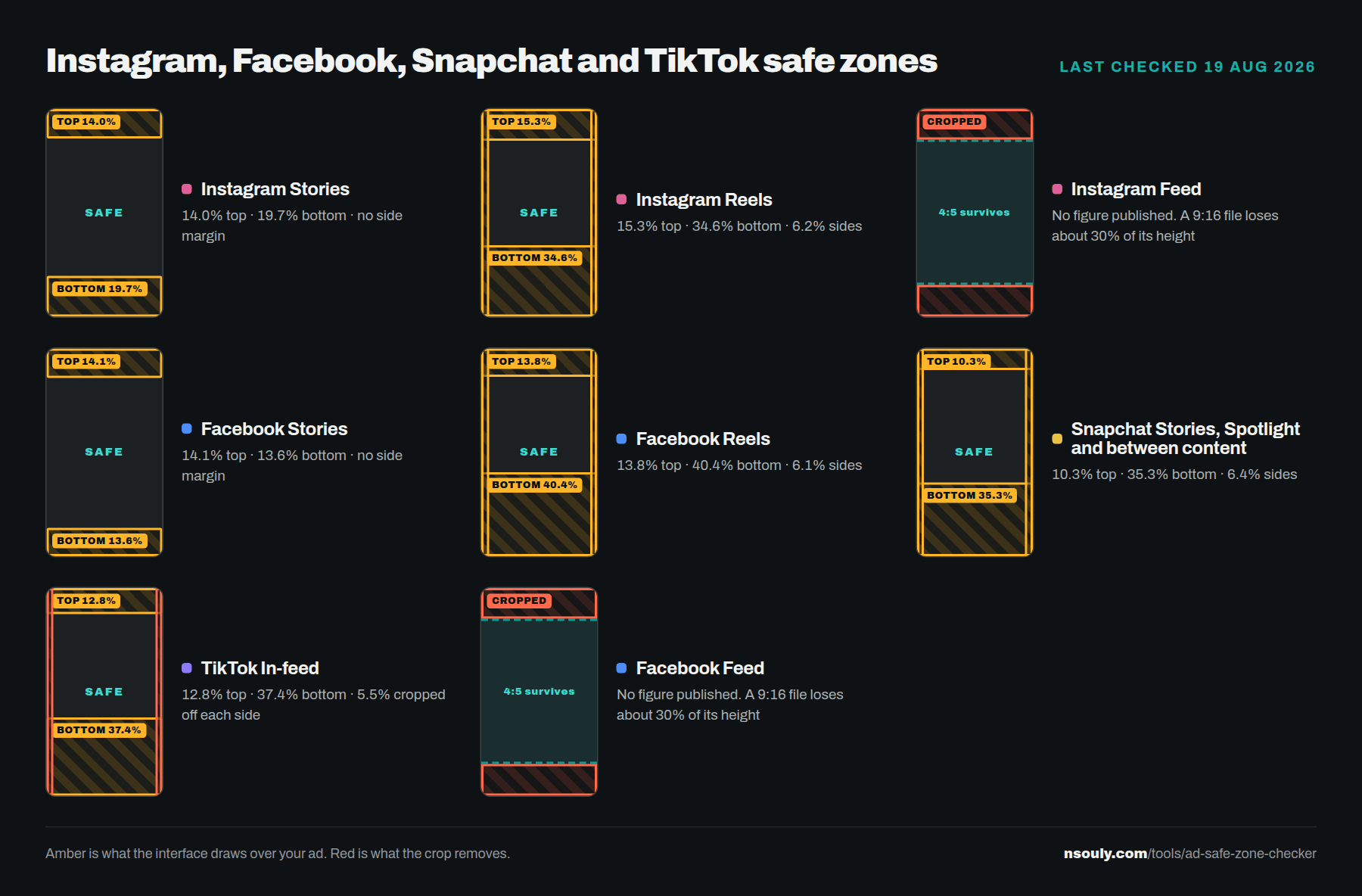
Meta publishes 14% off the top, 35% off the bottom and 6% on each side for both Instagram Stories and Instagram Reels. Its guardrail draws 14% and 19.7% on Stories with no side margin at all, and 15.3% and 34.6% on Reels with the side margin present at 6.2% against the published 6%.
Instagram Reels measures 6.2% down each side and Facebook Reels 6.1%, both matching the published 6% inside our margin of error. On Stories the guardrail draws nothing down the sides on either platform. We have no explanation for the difference, and Meta does not give one.
For Stories the safer read is the published one, because 35% is deeper than the 19.7% the tool draws. Clearing the deeper of two numbers costs you nothing. Clearing the shallower one is a bet.
Instagram Reels is also where the top edge runs deepest of anything we measured, 15.3% against a published 14%. That is why the export rule further down says 16% rather than 15%.
What is the Facebook Reels safe zone?
This is the one that costs money. Meta documents 35% at the bottom. Its own guardrail draws 40.4%. Build to the published figure and your headline sits inside a band that same tool marks as covered, and a safe zone checker built from the published page will draw 35% too.
Five points is about a hundred pixels at 1080 by 1920, and nearer a hundred and forty at the 1440 by 2560 Meta actually asks for. That is a line of headline type, or the whole call to action, on a placement we now see taking the largest share of a vertical budget.
There is a second thing worth clearing up here, and it is a clarification rather than a new measurement. Three figures circulate for the button column down the right of a Reel: 90px, 120px and 227px. Only one of them states a method. Cadenus measured 227px from a checker file Meta published in 2023. We have not found a stated method behind the other two, and the current guardrail draws no rail at all, treating the right side as a plain 6% margin top to bottom. The icons are still on screen when the ad runs, which is why our checker keeps an optional rail band. What is missing is a published figure for it.
What is the TikTok safe zone, and why is it different?
TikTok publishes no figures at all, only template files. Measured off its own overlay on 19 August 2026, an in-feed ad reserves 12.8% at the top and 37.4% at the bottom, which is deeper than anything Meta or Snapchat draws. It also crops your creative before it covers anything.
That 37.4% matters because 35% is the number people assume, by analogy with Meta. We have not found a measured figure for TikTok published anywhere, only the assumed one.
The crop is the stranger finding. TikTok previews a 9:16 file on a device that is roughly 9:18, so it scales the file to fill the height and about 11% of the width leaves the screen entirely. That is not a margin the interface sits on. It is gone before any overlay is drawn, which is why our tool marks it in red rather than amber.
Snapchat is the opposite case. It says it runs one safe zone across Stories, Spotlight and Commercials, and measured on 19 August 2026 it does: six captures across three formats land at 10.3% top, 35.2 to 35.6% bottom and 6.4% each side, agreeing to within 0.4 of a point. It is the only platform we measured whose documentation and whose own instrument give the same answer.
What should a designer build to?
One export clears every full screen vertical placement on all four platforms. Build 9:16 at 1440 by 2560, keep the top 16% clear, keep the bottom 41% clear, and leave 7% down each side. Instagram Reels sets the top at 15.3%, Facebook Reels sets the bottom at 40.4%, Snapchat sets the sides.
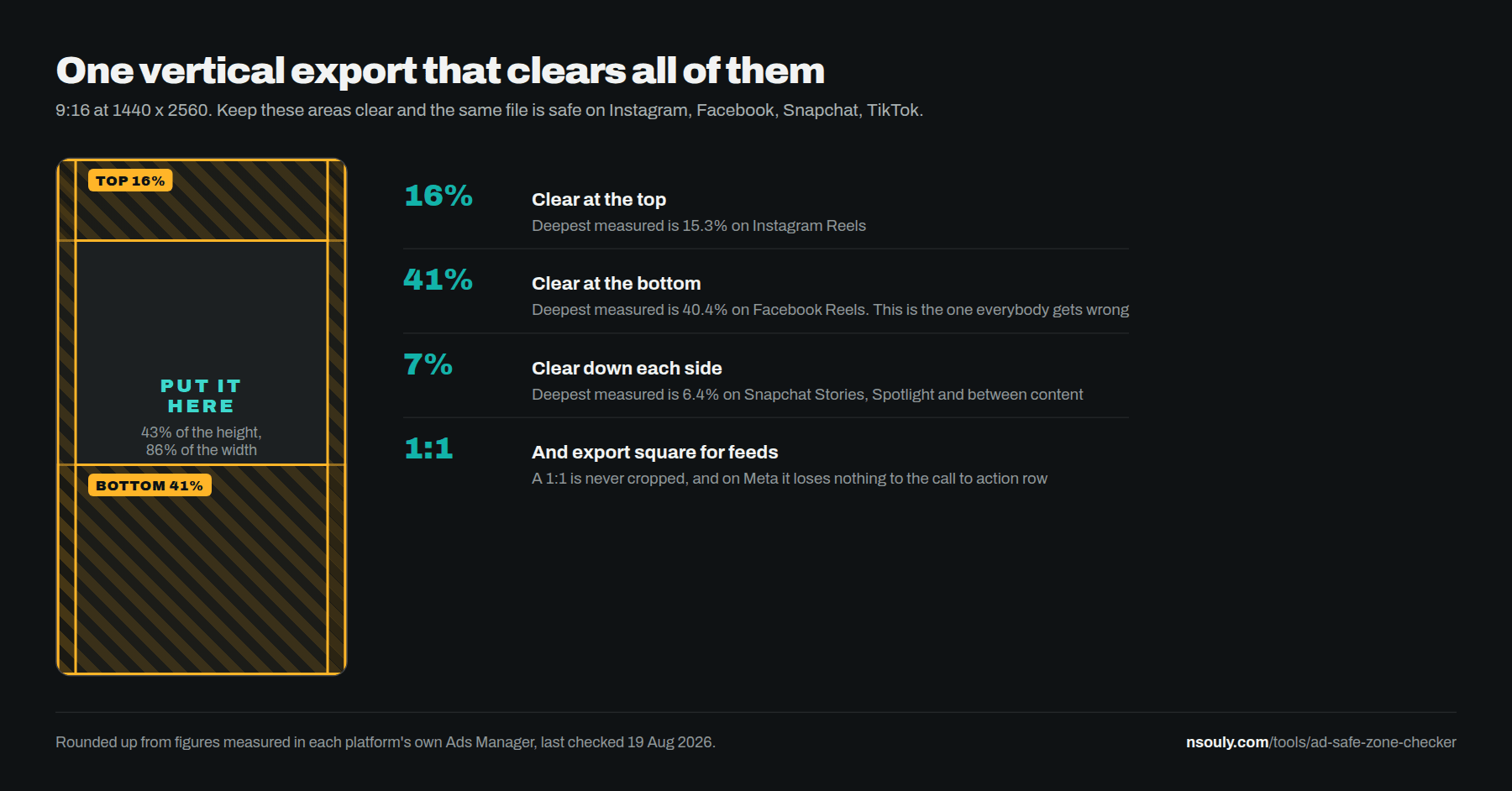
For feed placements, export square. We have not found a placement that crops a 1:1, and on Meta it is also the shape that loses nothing to the call to action row. A 4:5 upload in Feed gets cut back to a square so the button row fits inside the ad block. That one is ours, from live delivery: we have not found it documented anywhere, and the guardrail has no Feed preview to show it in.
Two more worth knowing. On TikTok a square is not the safe universal export, because the zone belongs to the phone rather than to your file, so a square gets a free top and then loses 27% at the bottom. And Meta’s own carousel page says one video card drops an Instagram Feed carousel from 4:5 to 1:1, on every card including the image ones. It is published. It is just never framed as a planning rule.
Every figure behind those rules, per platform and per ad type, is in the ad specs builder.
How did we measure it?
We uploaded a ruled white file into each platform’s own ad builder, turned its overlay on, took one capture, and found the boundary by colour rather than by eye. Every figure is then pinned to the rules printed on the creative itself, so a screenshot taken at any size gives the same answer.
That last part is the bit most published figures skip. Measuring against the screenshot means your number changes with your monitor. Measuring against marks printed inside the file means it does not.
Precision is about plus or minus half a percent, from one capture per placement. Where a platform publishes a figure we label it published and name the page. Where it does not, we label the number as ours. No figure on our tools appears without one of those two labels.
You can run the same check on your own files in the ad safe zone checker. It runs in your browser, nothing is uploaded, and it draws the measured bands alongside the documented ones.
What should you do before the next campaign?
Check the files you already have rather than trusting the export template you were given. Most creative fails in the same place, the bottom band, and it fails on the platform whose number nobody checked. Ten minutes against your last five ads tells you whether this is costing you anything.
One more thing, because it catches people out constantly. Cropping alone will not stop an ad delivering. Meta says so directly on its design recommendations page. A file at the wrong ratio still runs in every placement you left switched on, cropped by the platform rather than by you, and Ads Manager shows no warning when it happens.
The published figures come from Meta’s own Ads Guide, one page per placement, including the Instagram Stories page and the Facebook Reels page. We have not found a page ranking for ad specs in 2026 that says where its figures came from or how they were checked. That is the gap this is trying to fill.
If you would rather somebody just handled the creative and the buying, that is what we do, and what it costs.
Questions people actually ask
What is the Instagram Stories safe zone?
Meta publishes 14% off the top, 35% off the bottom and 6% on each side. Its own guardrail in Ads Manager draws 14% and 19.7%, and draws no side margin at all. Clear the published figure, because it is the deeper of the two and it costs you nothing to respect it.
What is the Facebook Reels safe zone?
Meta documents 14% top, 35% bottom and 6% sides. Measured on 14 August 2026, its own guardrail draws 40.4% at the bottom. That is more than five points deeper than the documentation, and it is the widest gap we found, because the headline usually sits there.
What is the TikTok safe zone?
TikTok publishes no numbers, only downloadable template files. Measured off its own overlay on 19 August 2026, an in-feed ad reserves 12.8% at the top and 37.4% at the bottom. It also scales a 9:16 file to fill a taller device, so roughly 11% of your width never reaches the screen.
Does a wrong aspect ratio stop an ad delivering?
No. Meta is explicit on Help Centre article 980593475366490 that cropping alone will not restrict delivery. A file exported at the wrong ratio still runs in every placement left switched on, cropped by the platform rather than by you. Only a placement opt out stops it.
What size should I export a vertical ad at?
9:16 at 1440 by 2560. Every Meta Stories and Reels image and video page recommends that size rather than the 1080 by 1920 most teams work in. Both run, because both are 9:16, but 1440 is the size the platform asks for and it gives you room when anything gets scaled up.
Is a square file a safe universal export?
On Meta, yes. A 1:1 loses nothing to the Feed call to action row where a 4:5 does. On TikTok, no. TikTok anchors its zone to the phone rather than to your file, so a square gets a free top and then loses 27% at the bottom plus an action rail.