Claude for Meta ads and Google Ads: what it really does
 My short answer
Claude for Meta ads works through Meta's own AI connector, open since 29 April 2026. It reads your campaigns, explains what changed and can build campaigns if you allow it. Google's version is read only. Feed it the right data, give it more control step by step, and stay the driver.
Claude for Meta ads went from a hack to an official feature this year. On 29 April 2026 Meta opened its own AI connector, so Claude and ChatGPT can read your ad account directly, explain what changed, and even build campaigns. Google has a read only version for Google Ads.
I run paid media for clients across the GCC, and Claude is now part of how I work every day: reports, account reviews, strategy and creative angles. Most guides on this topic are written by companies selling their own connector. This one is written from inside real ad accounts, including how to feed it so it knows a good lead from a cheap one.
The short version:
- Use the official connectors. Meta’s for Meta ads, Google’s for Google Ads. No browser extensions clicking around Ads Manager.
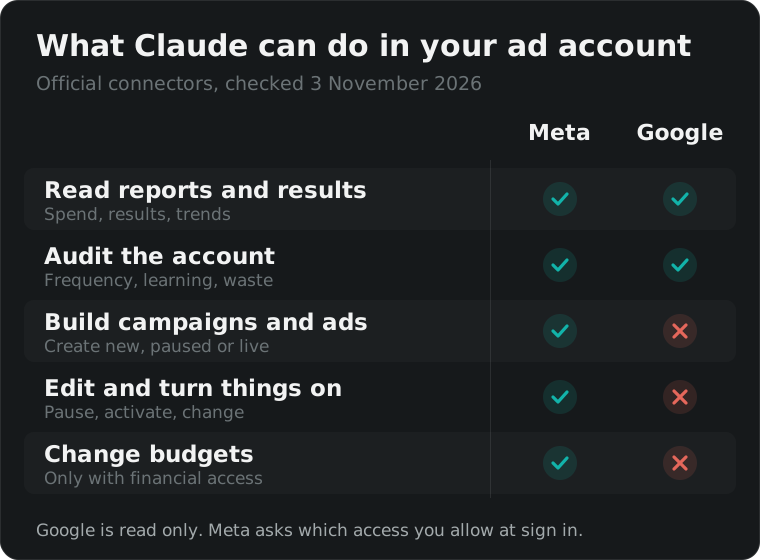
- Meta can read and write. Google can only read. That is how both are built today, not a setting.
- Give it control step by step. New to Ads Manager? Keep it read only. Know your way around? Let it build and edit, and check what it does.
- Feed it the right data. Connect your CRM so it knows which leads closed, not just which ones were cheap.
- You are still the driver. Too fast or too slow can both hurt the business.
- Check one day against Ads Manager before you trust any story it tells you.
What can Claude for Meta ads actually do?
Claude for Meta ads does 4 jobs through Meta’s connector: reporting, campaign management, catalog management and signal checks. In plain words, it pulls your numbers, explains them, builds or edits campaigns if you allow it, fixes product feeds, and checks whether your pixel and Conversions API are sending clean data to Meta.
The reporting side is where Claude for Meta ads earns its place today. Instead of exporting 3 reports and building a pivot table, you ask a question and get an answer with the numbers behind it, in seconds. Better work, in much less time.
What I use it for most:
- Weekly reads. “What changed this week and why?” It compares periods, spots the ad set that moved, and points at the likely cause.
- Client reports. It drafts the story behind the numbers, which I then edit in my own words.
- Strategy. A second opinion on a plan, and the gaps I would easily miss.
- Creative angles. Feed it the winning ads and the comments, ask for 10 new hooks in the same direction.
- The small things. A frequency creeping past 4, an ad set stuck in learning, a placement eating budget. The kind of thing you skip when a plan is due tomorrow morning.
That last point is a big reason to use it. It does not get tired at 1am before a deadline.
How do you connect Meta ads to Claude?
To connect Meta ads to Claude, add Meta’s official connector in Claude’s connector settings, sign in with the Facebook account that has access to the ad account, and pick which ad accounts and Pages it can reach. It takes a few minutes and needs no code, no developer app and no API keys of your own.
Setting up Claude for Meta ads, step by step:
- In Claude, open Settings, then Connectors, and add the Meta ads connector. Meta’s address for it is
mcp.facebook.com/ads. Use that one, not a copy from a tool seller. - Sign in with Facebook when asked. This is Meta’s own login screen, so your password never goes into Claude.
- Choose the ad accounts and Pages. Pick only the ones you need for this job.
- Run the first test below before you ask anything real.
The first test. Paste this before anything else:
List the ad accounts you can see, with their currency and time zone. Then show yesterday’s spend for each one. Do not create, edit, pause or turn on anything in this conversation.
Then open Ads Manager and check yesterday’s spend for one account. If it matches, you are connected properly. If the currency or the day is off, you have found your first problem before it got into a client report.
If a tutorial tells you to install a browser extension that clicks around Ads Manager for you, skip it. The official connector reads the real numbers instead of what fits on the screen, and access can be removed from Meta’s business settings in one click.
| Meta ads AI connector | Google Ads MCP | |
|---|---|---|
| Made by | Meta | |
| Available since | Open beta, 29 April 2026 | Read only release, October 2025 |
| Reads reports | Yes | Yes |
| Builds or edits campaigns | Yes, if you allow it | No, strictly read only |
| What you need | A Claude or ChatGPT plan with connectors | A Google Cloud project with Explorer access or higher |
| Cost today | Free in beta | Free |
Does Claude work with Google Ads too?
You can use Claude with Google Ads, but only to read. Google’s official Google Ads MCP server lets Claude list your accounts and run reporting queries, and Google’s own documentation calls it strictly read only. It cannot pause a campaign, change a bid or write an ad, which is fine for most of what you need from it.
The setup is more technical than Meta’s. You need a Google Cloud project with Google Ads API access at Explorer level or higher, and an OAuth client. The good news: Google says developer tokens are no longer needed since 9 September 2026, because access now follows the Cloud project. I set ours up this week and Explorer access was approved in minutes, with no manager account.
If you already use Claude for Meta ads, the Google side answers the same questions. It just cannot act on the answers.
One number worth knowing. Explorer access allows 2,880 API calls a day on real accounts, as shown in our Google Cloud console on 3 November 2026. That is plenty for reporting on a handful of accounts. It is not enough to let an agent check every campaign every few minutes, so ask for daily or weekly views, not live ones.
What should you ask Claude about your ads?
Ask Claude for Meta ads the questions you would ask a sharp analyst, with your business context attached. Vague prompts get generic advice. Good ones include the goal, the target cost, the period, and what counts as a result for this business. The more it knows about the business, the less it guesses, and the better the answer.
Start every Claude for Meta ads conversation with a short brief, then pick from the prompts below. Swap the numbers for your own.
The brief:
This account sells [product] in [country]. The result that counts is [purchases / leads / sign ups], target cost per result is [amount and currency]. We report in [currency], Monday to Sunday. Never suggest changes that would reset the learning phase without saying so.
Reporting
| Prompt | Why it works |
|---|---|
| “Compare the last 7 days with the 7 before. What changed and what caused it?” | Forces a cause, not just a list of numbers |
| “Which 3 ad sets spent the most this month, and what did each one return per result?” | Shows where the money actually went |
| “Show results by placement this month. Where is cost per result highest?” | Placements hide waste |
| “Write 5 short points for the client on last month. Lead with results, then what we change next.” | A report draft you edit, not write |
Audits
| Prompt | Why it works |
|---|---|
| “List ad sets with frequency above 3.5 in the last 14 days.” | Early sign of creative fatigue |
| “List ad sets still in learning after 7 days, with their daily budget.” | Usually a budget too small for the result |
| “Find ads that spent this month with zero results.” | The cheapest win in most accounts |
| “Find audiences that overlap across active ad sets.” | You compete with yourself in the auction |
| “Is anything limited by budget, rejected, or with a payment issue?” | The boring problems that stop delivery |
Creative
| Prompt | Why it works |
|---|---|
| “Rank our ads by cost per result this month and tell me what the top 3 have in common.” | Finds the pattern, not just the winner |
| “Give me 10 hooks in the same direction as our best ad, in English and Gulf Arabic.” | Volume for testing, in both languages |
| “Which ads have the highest click rate but poor results after the click?” | The landing page, not the ad, is the problem |
Tracking and planning
| Prompt | Why it works |
|---|---|
| “Check pixel and Conversions API health and list anything that hurts optimisation.” | Bad signals make every other fix pointless |
| “Which events fire, and which one is each campaign optimising for?” | Catches campaigns optimising for the wrong event |
| “Plan a 4 week test for [budget]. What would you test first and why?” | A starting plan to argue with |
| “Ramadan starts in early February. What should we prepare in this account by mid January?” | Planning around the GCC calendar |
A tip a Meta client partner gave early users of the connector: remind your agent about the learning phase. That is why it sits in the brief above.
What does a good answer look like?
A good answer names the period, the result it counted, the change, and the likely cause, in that order, and it says what it is not sure about. If an answer is all adjectives and no numbers, or if it never says which result it counted, ask again. That habit catches most problems before they reach a client.
This is the shape of answer I want from a weekly read on a lead generation account. The numbers are an example, not a client’s:
Last 7 days against the 7 before, results counted as leads from the instant form. Cost per lead rose 22%. Almost all of it came from one ad set, where frequency reached 4.1 and click rate fell by a third. The other 2 ad sets held steady. Likely cause: the same 2 videos have run for 5 weeks. Suggest adding 2 new creatives to that ad set rather than cutting its budget, which would restart learning. Not sure: 9 leads came from Audience Network, which you may want to check for quality.
Every part of it can be checked in Ads Manager in 2 minutes. That is the test of a useful answer.
Where does Claude get ads wrong?
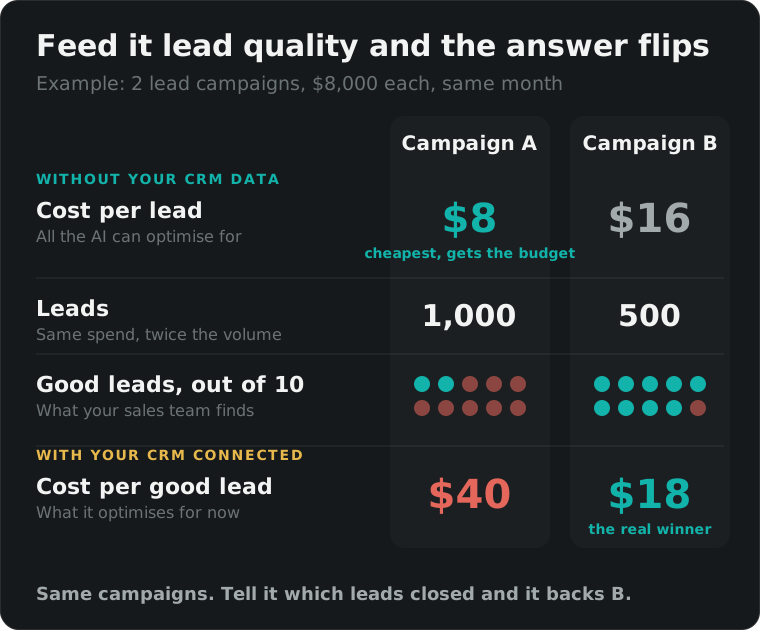
Claude gets ads wrong when it only has half the picture. It analyses the data it receives, nothing more. If the only thing it can see is the cost per lead, it will chase cheap leads, and say it with full confidence. Give it the outcome, which leads became customers, and the answer changes.
The old lead gen trap. For years this was the classic problem with lead campaigns. Say you run 2 lead generation campaigns on Advantage+ at the same time. Campaign A brings leads at half the cost of campaign B, so the budget moves to A, because on paper A is twice as efficient.
Then your sales team finds out most of A’s leads are junk, while B’s leads are the ones that actually close. A low cost per lead never said anything about lead quality. The cheap campaign takes the whole budget, the good one starves, and you end up hiring more salespeople or call center staff to chase leads that will never buy. You lose money twice, on the ads and on the hires.
An AI that only sees cost per lead walks into the same trap, just faster. Ask Claude for Meta ads to cut waste with nothing else to go on, and it will back campaign A.
Now it can tell a good lead from a cheap one. You just have to feed it:
- Your CRM, through Meta’s Conversions API. Send back which leads qualified and which ones closed, then optimise for that stage instead of the form submit. Meta says advertisers doing this see about 21% lower cost per quality lead on instant forms.
- Checks on the form itself. Meta’s instant forms can now ask leads to verify their phone number by text, or require a work email.
- The same CRM data in Claude. Connect your CRM to Claude, or paste an export, and it can work out the cost per good lead for each campaign. In the example below, it backs campaign B.
The catch: someone has to keep lead stages updated in the CRM, and enough leads have to reach the stage you pick. If only around 5% get there, Meta has too little to learn from. If your lead volume is small, pick a stage that a third to half of your leads reach.
Ecommerce was always easier. A purchase comes with a value. Claude for Meta ads can optimise for return on ad spend and conversion value, spot your best sellers and suggest which products to push, all from real data.
The fix in one line: tell it what counts as a result for each business, and send it the outcome, not just the click.
Why don’t Claude’s numbers match Ads Manager?
When Claude for Meta ads gives numbers that differ from Ads Manager, it is almost always a setting, not a bug. Check 4 things in this order: the attribution setting, the time zone, the currency, and which event counts as a result. Ask which of each it used, then compare one campaign on one day.
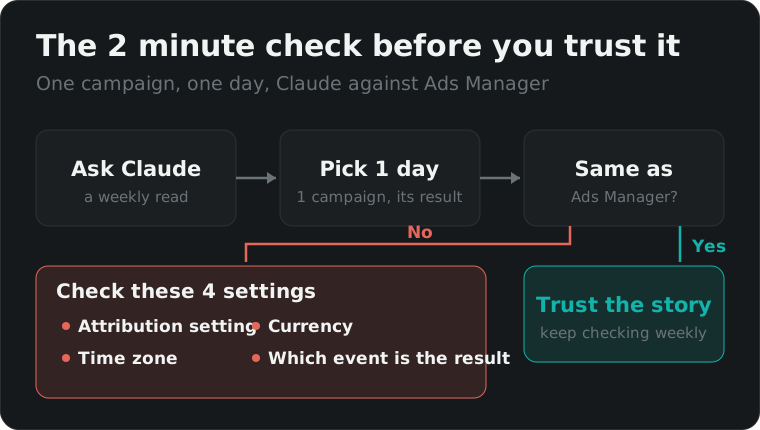
| Mismatch | What to ask Claude |
|---|---|
| Results are higher or lower | “Which attribution setting did you use? Use 7 day click, 1 day view.” |
| Totals are off by a day | “Which time zone are these dates in? Use the ad account’s time zone.” |
| Spend looks wrong | “Which currency is this in? Report in the account currency.” |
| Results show zero | “Which event did you count as a result? Our result is [event name].” |
| An account is missing | Reconnect and tick that ad account when you sign in with Facebook |
Should you let Claude change your ad account?
Yes, once you can check what it does, and at a speed you control. If you are new to Ads Manager, keep Claude read only. If you know your way around, let it build, edit and move budgets, one responsibility at a time. Either way, you stay the driver.
A lot of people say you can just connect Claude to Ads Manager and it will do the job for you. Technically you can. But its work depends heavily on you, the driver. Feed it the wrong goal or half the data and it gives you the wrong answer in the most convincing way possible.
Think of it like driving. Go too fast, handing it budgets before you can check its work, and you can crash the account. Go too slow, keeping it on read only forever, and you fall behind everyone who uses it well. And riding a bicycle in the middle of a highway, a half set up AI on a big budget, can hurt your business just the same. It is not about AI or no AI. It is how you use it.
From 20 November 2026 Meta’s new terms say the business is solely responsible for what its AI features create or change. If an agent you connected changes something, the account is yours and so is the result.
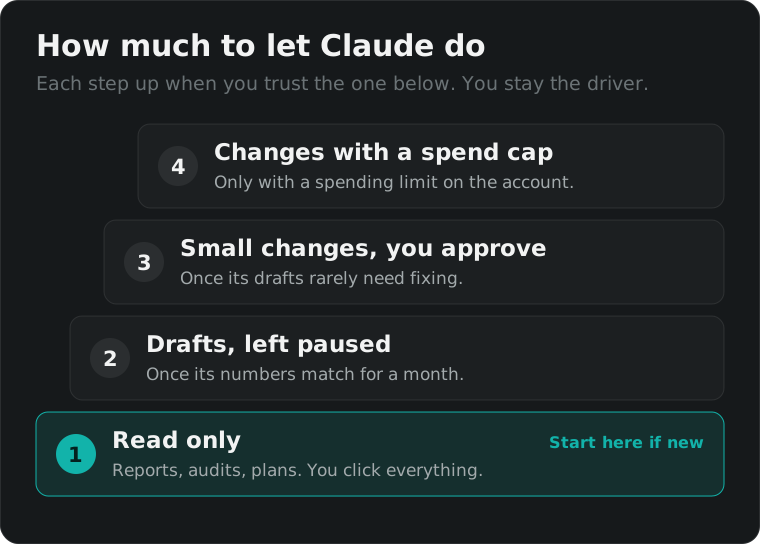
This is how I use Claude for Meta ads safely with clients. Each step up comes when I am confident in the one below, not on a date:
- Read only if you are new to Ads Manager. Reports, audits and plans, and you click everything.
- Drafts, left paused once its numbers match Ads Manager week after week. It builds, you review and switch on.
- Small changes with your OK, like pauses and budget moves, once its drafts rarely need fixing.
- Changes on its own inside a spending limit set in Meta’s billing settings, once you trust its judgement on that account.
- For lead gen, connect your CRM first. Without lead quality data, keep it away from budget decisions.
- One account at a time, and the client’s OK first if it is their account.
And if you have experienced people on your team, trust them first. Use AI to make them faster, not to replace their judgement.
Where this is heading is clear. Claude will run whole ad accounts, and one day whole businesses. We are getting there, just not all the way yet, and the people who get there first will be the ones who learned to drive it well.
How do you get better results from Claude over time?
Feed it more about each business and check its work, and trust builds with time. Claude does not learn your client by itself. It learns what you give it: the goal, the target cost, past reports, what worked, what the client hates. The more context you keep feeding it, the better its answers get.
Claude for Meta ads gets better the more you feed it. I started with read only and checked every number by hand. A few months in, I catch myself trusting its read on an account more than my own tired one on a Thursday night. That trust came from checks, not from hope.
What makes the biggest difference:
- A short brief per client. The brief above, saved in a Claude project so every chat starts with it.
- Your CRM. Lead stages and closed deals. That is how Claude for Meta ads learns a good lead from a cheap one.
- Past reports. It writes far better when it can see how you explained last month.
- Your corrections. When it gets something wrong, tell it why. That correction is context for next time.
- A fixed weekly routine. Same prompts, same day, same period. Changes stand out when everything else stays the same.
If you want help setting this up properly for your own ad account, or want me to run the account with it, book a call. If you are weighing whether to advertise inside AI assistants themselves, read my guide to ChatGPT ads. And before you trust any AI with your results, make sure your advertisement tracking sends the right events in the first place.
Sources: Meta’s connector launch as reported by PPC Land, Google’s Google Ads MCP server documentation, and Meta’s new terms as reported by Relevant Audience. Meta’s lead quality figures and form checks as reported by Zapier and Social Media Today. Checked on 4 November 2026.
Questions people actually ask
Is the Meta ads AI connector free?
Yes, for now. Meta opened it as an open beta on 29 April 2026 and has not announced a price for after the beta. You need a Claude or ChatGPT plan that supports connectors and an ad account you can already access. Treat free as a beta word, not a promise, and do not build a client process that falls apart if pricing changes.
Can Claude change my Meta campaigns?
It can if you let it. Meta's connector covers reporting, campaign management, catalogs and signal checks, and the campaign side can create and edit campaigns, ad sets and ads. You choose the access when you sign in with Facebook. If you can check its work in Ads Manager, let it build and edit step by step, with a spending limit on the ad account first. Meta's draft mode also saves new campaign work for review before it goes live.
Does Claude work with Google Ads?
Yes, but only to read. Google's official Google Ads MCP server is strictly read only, so it can pull campaigns, budgets and results with GAQL queries but cannot pause, bid or create anything. It needs a Google Cloud project with Explorer access or higher. Google says developer tokens are no longer needed for it since 9 September 2026.
Why do Claude's numbers not match Ads Manager?
Usually one of 4 things: a different attribution setting, a different time zone, a different currency, or a result counted as a custom event that Claude was not told about. Ask it which date range, attribution setting and currency it used, and compare one campaign for one day with Ads Manager. If that day matches, the rest will too.
Is it safe to connect a client's ad account to Claude?
Use the official connectors, not a browser extension clicking around Ads Manager, and give the least access the job needs. Ask the client first if you manage their account. Connect one account at a time, keep a record of what you asked it to do, and remove access in Meta's business settings when the work is finished.
Can AI tell good leads from bad ones?
Yes, if you feed it the outcome. On its own, a lead campaign only sees the form submit, so it chases the cheapest leads. Connect your CRM through Meta's Conversions API and send back which leads qualified and which ones closed, and Meta can optimise for those instead. Give Claude the same CRM data and it can compare the cost per good lead by campaign.